
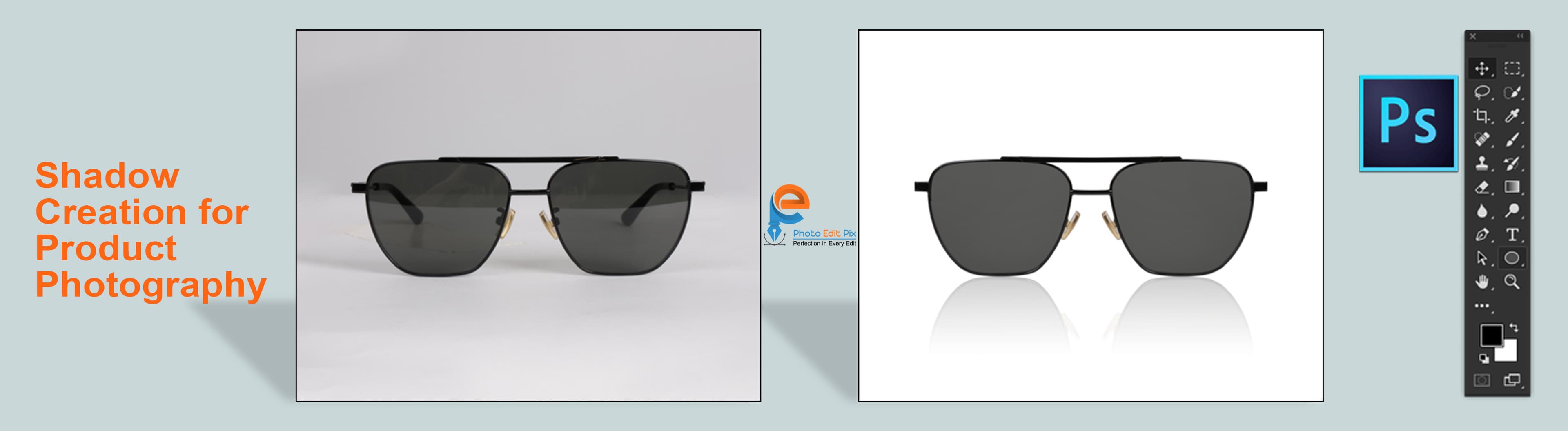
Shadow Creation for Product Photography: Professional Guide 2024
Master shadow creation techniques for professional product photography. Learn how to add realistic shadows that enhance depth and make products stand out.

Shadow creation is a crucial photo editing technique that adds depth, dimension, and realism to product images. Professional shadows make products appear grounded and enhance their visual appeal in e-commerce and catalog photography.
Why Shadow Creation Matters
Professional shadow creation:
Types of Shadows
1. Natural Shadow
Realistic, soft shadows that match natural lighting conditions. Perfect for most product photography.
2. Drop Shadow
Subtle shadows beneath products that create depth and elevation. Ideal for e-commerce images.
3. Reflection Shadow
Realistic reflections on surfaces like glass, mirrors, or polished floors. Creates premium appearance.
4. Cast Shadow
Shadows that products cast on surfaces. Adds realism and depth.
5. E-commerce Shadow
Consistent, professional shadows across all product images. Maintains brand aesthetic.
Shadow Creation Techniques
1. **Light Direction**: Match shadow direction to light source
2. **Opacity Control**: Adjust shadow intensity naturally
3. **Blur and Softness**: Create realistic shadow edges
4. **Color Matching**: Match shadow color to surface
5. **Distance Control**: Set appropriate shadow distance
Best Practices
Applications
Professional Techniques
Common Mistakes to Avoid
Professional Services
At photoeditpix, we offer professional shadow creation services that enhance your product images with realistic, natural-looking shadows. Our expert editors create shadows that match lighting conditions and surface types for professional results.
Related Articles

Professional Background Removal Guide: Transform Your Product Images in 2024
Learn how professional background removal can transform your e-commerce product images. Discover the best techniques, tools, and tips for creating clean, transparent backgrounds that make your products stand out.

Complete Guide to Clipping Path Services: Everything You Need to Know
Master the art of clipping path services with our comprehensive guide. Learn about different types of clipping paths, when to use them, and how they can enhance your product photography.
Color Correction in Photo Editing: Essential Tips for Perfect Product Images
Discover professional color correction techniques to enhance your product images. Learn how to adjust white balance, exposure, and color grading for stunning results.